

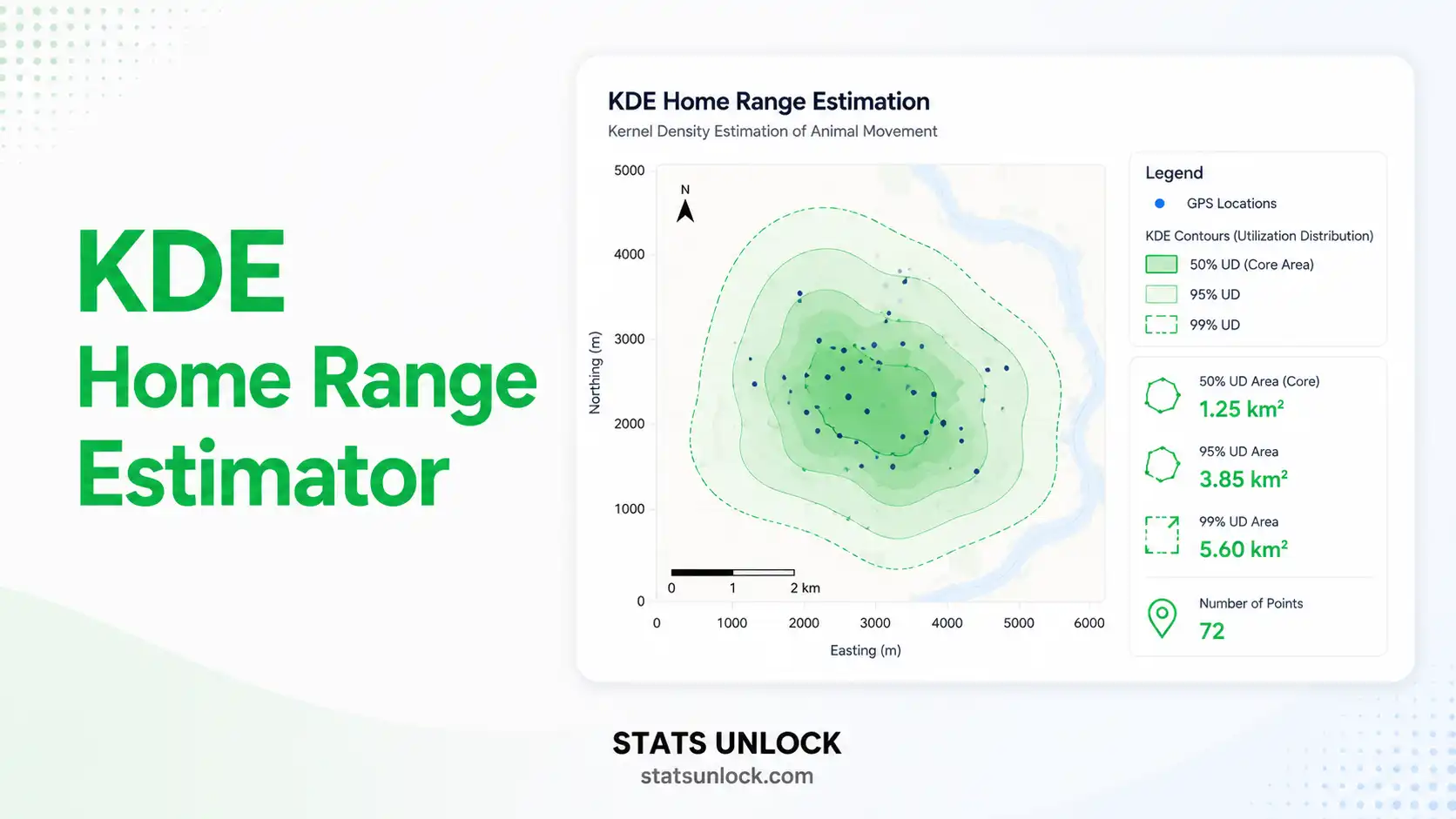

Kernel Density Estimation (KDE) — Home Range Estimator
Free wildlife analysis tool to estimate animal home ranges (95% UD) and core areas (50% UD) using non-parametric kernel density estimation on GPS or telemetry location data.
📍 1. Data Input
Enter latitude / longitude coordinates of animal location fixes (GPS collar, VHF triangulation, or visual relocations). Decimal degrees, WGS84.
0 location fixes parsed
File must contain numeric latitude and longitude columns. Headers detected automatically.
Spreadsheet-style entry. Add/remove rows as needed.
| # | Latitude | Longitude | Action |
|---|
⚙️ 2. KDE Configuration
Tune the kernel and contour percentages before running the home range estimation.
All four isopleths are computed and reported by default.
📐 Technical Notes — Bandwidth, Kernels, and Assumptions
Reference (href) bandwidth: For a bivariate normal kernel, href = σ · n−1/6, where σ is the pooled standard deviation of the two coordinate axes. This estimator is appropriate when the underlying utilization distribution is approximately bivariate normal and is the most commonly reported method in wildlife studies (Worton, 1989).
Least Squares Cross-Validation (hLSCV): Selects bandwidth by minimising the mean integrated squared error. Can fail to converge for highly autocorrelated data — common in modern GPS collars with short fix intervals.
Plug-in bandwidth (hpi): Two-stage estimator (Sheather & Jones, 1991) that is generally less biased than href when the UD is multimodal.
Assumptions: independent fixes, no positional error, animal home range is closed (no migration), kernel is appropriate for the spatial scale of movement.
Limitations: KDE assumes spatial independence of fixes which is rarely met by GPS data sampled every < 4 h. Autocorrelated data inflates the perceived home range. Consider Autocorrelated KDE (AKDE; Fleming et al., 2015) for high-frequency telemetry.
✅ When to Use This KDE Home Range Estimator
Decision checklist
- ✓ You have ≥ 30 independent location fixes from one animal
- ✓ You want a probabilistic (not just polygon) home range estimate
- ✓ You need both home range (95%) and core area (50%) reported
- ✓ You want a publication-ready KDE home range result for a US wildlife journal
- ✗ Do NOT use if < 20 fixes are available — use MCP instead
- ✗ Do NOT use raw KDE for high-frequency GPS data without checking autocorrelation — use AKDE
- ✗ Do NOT use for migratory animals across full annual cycle — partition by season first
Real-world examples (USA)
- Mule deer in Colorado: seasonal home range partitioning across winter and summer ranges
- Florida black bear: male vs. female home range size comparison for connectivity planning
- Mountain lion in California: core area overlap with urban-wildland interface
- Wild turkey in Texas: brood-rearing home range during nesting season
Sampling design guidance
- Minimum 30 fixes per animal; 50–100+ preferable for stable KDE
- Fix interval should be long enough for biological independence (typically ≥ 4 h)
- Sample across the full activity cycle (day + night)
- Pool fixes by individual, season, or sex before estimating
Related home range estimators
- Need a deterministic polygon? → MCP (Minimum Convex Polygon)
- High-frequency GPS with autocorrelation? → AKDE (Autocorrelated KDE)
- Movement-based weighting? → Brownian Bridge MM (BBMM)
- Local convex hulls? → LoCoH (k-NN, a-LoCoH, r-LoCoH)
📘 How to Use This Tool — Step-by-Step
- Enter your data: paste latitude/longitude as comma-separated values, upload a CSV/Excel file, or use the manual table. The textarea expects values like:
40.4523, 40.4531, 40.4519, ... - Choose a sample dataset: 5 ecological datasets (mule deer, coyote, black bear, mountain lion, wild turkey) are available from the dropdown.
- Configure bandwidth: use Reference (href) by default. Select LSCV or plug-in for advanced cases.
- Set isopleths: the standard convention is 95% home range and 50% core area.
- Click "Run KDE Home Range Analysis": nothing runs on page load — you must click the button.
- Read summary cards: green = full home range; amber = core area; deep green = bandwidth.
- Read the full results table: includes all metric components, n, bandwidth, isopleth areas.
- Examine the four visualisations: KDE map, UD curve, isopleth-area curve, fix histogram.
- Copy the right reporting template: journal, dissertation, plain language, abstract, monitoring, or full research poster.
- Export your results: Doc (.txt) for editing or PDF for printing/sharing.
Worked example: A wildlife biologist tracks one female mule deer in Routt County, Colorado, with a GPS collar transmitting every 4 hours for 30 days, yielding 180 location fixes. Pasting the lat/lon columns, running KDE with href and the 95%/50% defaults, returns a 95% home range of approximately 240 ha and a 50% core area of approximately 45 ha — typical for adult mule deer in mountain shrubland habitat.
❓ Frequently Asked Questions about KDE Home Range Estimation
What is kernel density estimation (KDE) in wildlife ecology?
KDE is a non-parametric statistical method that estimates a smooth probability density function (the utilization distribution) from a set of discrete animal location points. The 95% isopleth of this density defines the home range, and the 50% isopleth defines the core area (Worton, 1989).
What is the difference between the 95% and 50% home range?
The 95% isopleth encloses the area within which the animal is found 95% of the time — the conventional home range definition. The 50% isopleth represents the most intensively used half of the utilization distribution — the core area, often interpreted as primary habitat or refuge.
How many GPS fixes do I need for a reliable KDE?
A minimum of 30 independent location fixes is recommended; 50–100+ produces more stable estimates. With fewer than 20 fixes, KDE results are unreliable and the Minimum Convex Polygon (MCP) is a safer choice.
Which bandwidth selector should I use?
Reference bandwidth (href) is the most reported method and is appropriate for unimodal home ranges. Least Squares Cross-Validation (LSCV) can reduce oversmoothing but often fails with autocorrelated data. Plug-in bandwidth performs well with multi-modal UDs.
Can I use latitude and longitude directly with KDE?
Yes — this tool accepts decimal-degree lat/lon, then internally projects to a local equal-area frame in meters so the resulting areas are correct in hectares, km², or acres. For studies spanning > 100 km, a formal projection (e.g., UTM, Albers Equal Area) is recommended.
What does it mean when LSCV fails to converge?
It usually means the GPS fixes are spatially autocorrelated (too close in time). In that case the algorithm is unable to find a finite minimum and either fails or returns an unrealistically small bandwidth. Switch to href or use AKDE.
What is autocorrelated KDE (AKDE) and when do I need it?
AKDE (Fleming et al., 2015) accounts for the temporal autocorrelation of modern GPS data. It is the gold standard for fix intervals shorter than the animal's typical mean revisit time (i.e., most GPS collars at 1–4 h fix rates).
Is KDE better than Minimum Convex Polygon (MCP)?
KDE is probabilistic and reports both the home range and core area, while MCP is a deterministic outer hull. KDE is preferred for ecological inference, but MCP remains the international comparability standard required by many older studies and management plans.
How do I report a KDE home range in a manuscript?
Always report n (fixes), bandwidth method, kernel type, isopleth %, area + units, and the software used. Example: "95% KDE home range = 240 ha (href = 95 m, Gaussian kernel, n = 180 fixes, calculated in adehabitatHR R package; Calenge, 2006)."
Is this KDE home range tool free for US wildlife researchers?
Yes — this tool is 100% free, runs entirely in the browser, requires no signup, and is optimised for US wildlife biologists working on deer, bear, coyote, mountain lion, wild turkey, and similar species.
📚 References
Foundational and methodological sources for kernel density estimation, bandwidth selection, autocorrelated KDE, and comparison with alternative home range estimators.
- Worton, B. J. (1989). Kernel methods for estimating the utilization distribution in home-range studies. Ecology, 70(1), 164–168. https://doi.org/10.2307/1938423
- Seaman, D. E., & Powell, R. A. (1996). An evaluation of the accuracy of kernel density estimators for home range analysis. Ecology, 77(7), 2075–2085. https://doi.org/10.2307/2265701
- Seaman, D. E., Millspaugh, J. J., Kernohan, B. J., Brundige, G. C., Raedeke, K. J., & Gitzen, R. A. (1999). Effects of sample size on kernel home range estimates. Journal of Wildlife Management, 63(2), 739–747. https://doi.org/10.2307/3802664
- Silverman, B. W. (1986). Density Estimation for Statistics and Data Analysis. Chapman & Hall.
- Calenge, C. (2006). The package adehabitat for the R software: a tool for the analysis of space and habitat use by animals. Ecological Modelling, 197, 516–519. https://doi.org/10.1016/j.ecolmodel.2006.03.017
- Fleming, C. H., Fagan, W. F., Mueller, T., Olson, K. A., Leimgruber, P., & Calabrese, J. M. (2015). Rigorous home range estimation with movement data: a new autocorrelated kernel density estimator. Ecology, 96(5), 1182–1188. https://doi.org/10.1890/14-2010.1
- Kie, J. G., Matthiopoulos, J., Fieberg, J., Powell, R. A., Cagnacci, F., Mitchell, M. S., Gaillard, J.-M., & Moorcroft, P. R. (2010). The home-range concept: are traditional estimators still relevant with modern telemetry technology? Philosophical Transactions of the Royal Society B, 365(1550), 2221–2231. https://doi.org/10.1098/rstb.2010.0093
- Powell, R. A. (2000). Animal home ranges and territories and home range estimators. In L. Boitani & T. K. Fuller (Eds.), Research Techniques in Animal Ecology (pp. 65–110). Columbia University Press.
- Sheather, S. J., & Jones, M. C. (1991). A reliable data-based bandwidth selection method for kernel density estimation. Journal of the Royal Statistical Society B, 53(3), 683–690. https://doi.org/10.1111/j.2517-6161.1991.tb01857.x
- Gitzen, R. A., Millspaugh, J. J., & Kernohan, B. J. (2006). Bandwidth selection for fixed-kernel analysis of animal utilization distributions. Journal of Wildlife Management, 70(5), 1334–1344. https://doi.org/10.2193/0022-541X(2006)70[1334:BSFFAO]2.0.CO;2
- Walter, W. D., Onorato, D. P., & Fischer, J. W. (2015). Is there a single best estimator? Selection of home range estimators using area-under-the-curve. Movement Ecology, 3, 10. https://doi.org/10.1186/s40462-015-0039-4
- Laver, P. N., & Kelly, M. J. (2008). A critical review of home range studies. Journal of Wildlife Management, 72(1), 290–298. https://doi.org/10.2193/2005-589
- R Core Team. (2024). R: A language and environment for statistical computing. R Foundation for Statistical Computing. https://www.R-project.org/
- Signer, J., Fieberg, J., & Avgar, T. (2019). Animal movement tools (amt): R package for managing tracking data and conducting habitat selection analyses. Ecology and Evolution, 9(2), 880–890. https://doi.org/10.1002/ece3.4823
- Burt, W. H. (1943). Territoriality and home range concepts as applied to mammals. Journal of Mammalogy, 24(3), 346–352. https://doi.org/10.2307/1374834